Update AWB Status
To update an existing Air Waybill (AWB) status:
- Go to the Statuses table via:
Settings→Shipment Statuses. - Click the Edit icon in the Actions column for the status you want to update.
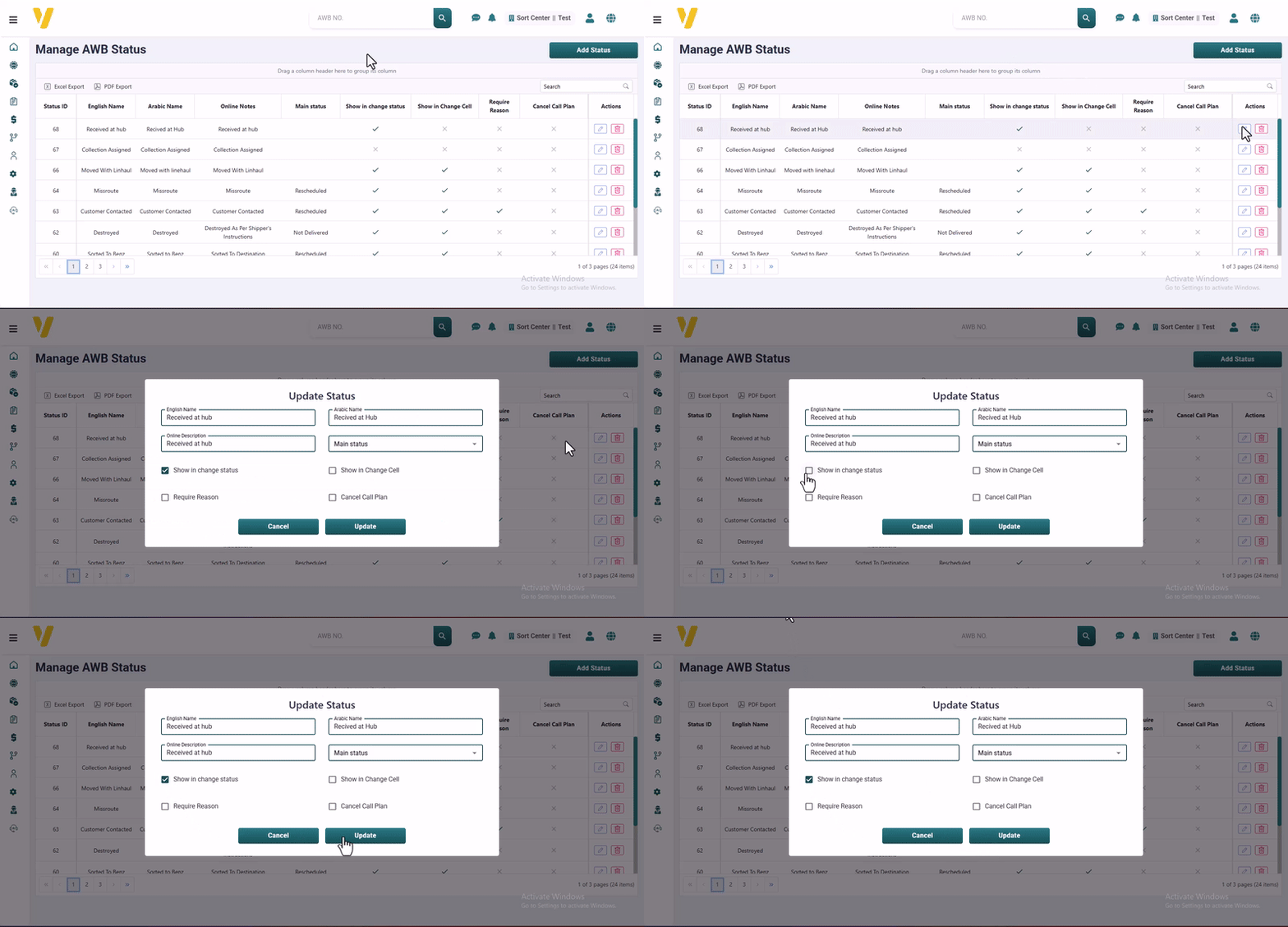
Editable Fields in an AWB Status
When editing a status, the following fields are available for customization:
-
English Name / Arabic Name
The names shown internally and on the user interface. Use clear and descriptive terms in both languages. -
Online Description
A message or explanation that appears to customers or users online. It helps explain the meaning or stage of the status. -
Main Status
A checkbox indicating whether this is a primary status used in main workflows. Usually, only one main status is active at a time. -
Show in Change Status
When enabled, this status appears in the dropdown list of status changes. Useful for statuses that are part of the workflow. -
Show in Change Cell
Controls whether this status appears as an option within quick actions in the table — typically for warehouse or logistics interfaces. -
Require Reason
When enabled, users must provide a reason when switching to this status. This helps with accountability and detailed tracking. -
Cancel Call Plan
When selected, switching to this status cancels any scheduled follow-ups or call plans automatically.
Editing these fields allows you to customize the AWB tracking process so it perfectly matches your company’s operations.